Getting started with YuruFun
Follow the screens, from your first sign-in to your YURU COIN balance.
Screen examples use the Japanese interface.
- 01
Create your account
Select Connect wallet, then sign up with email.
1Select Connect wallet 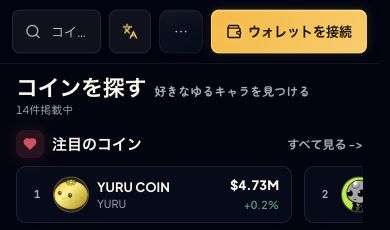
2Enter your email address 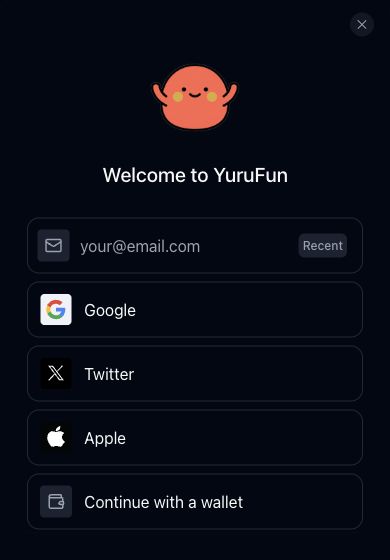
Details & checks
- Select Connect wallet, then choose email or another method shown on screen.
- For email, enter the code sent to your inbox. Your first sign-in creates your account.
- Returning users should use the same sign-in method as before.
Your account or wallet indicator replaces Connect.
- 02
Check your wallet
Open your account and check its receive address.
1Open Add funds 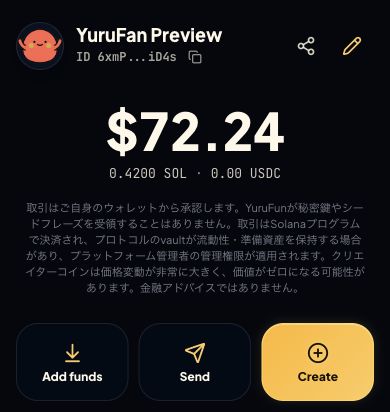
Illustrative screen · balances are examples
Details & checks
- Email and supported social sign-ins create a Solana wallet if you do not already have one.
- Desktop: Receive SOL. Mobile: Add funds → Receive address / QR.
- Check that the receive address belongs to the wallet you will use for the purchase.
You have checked the account and receive address.
- 03
Prepare SOL
Send SOL to the receive address and wait for the balance update.
1Show or copy your receive address 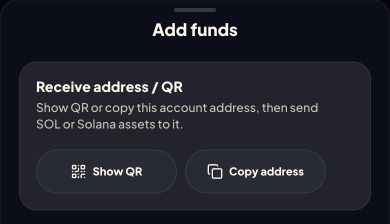
Illustrative screen · balances are examples
2Check your SOL balance 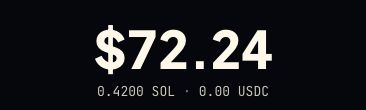
Illustrative screen · balances are examples
Use the receive address shown in your own wallet.
Details & checks
- Copy the receive address. Select the Solana network at the sender and compare the complete destination address.
- Keep SOL for network fees and any token-account creation cost as well as the purchase.
- This procedure uses SOL transfers. Check the screen for available funding methods; card or cash top-ups are not guaranteed.
The correct wallet shows your SOL balance.
- 04
Find YURU COIN
Search for YURU and compare the full address below.
1Select YURU COIN 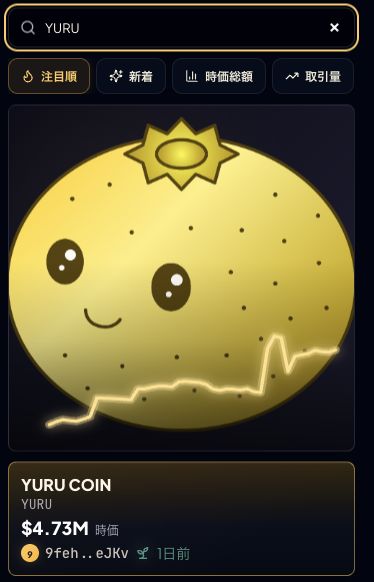
2Check the mint address 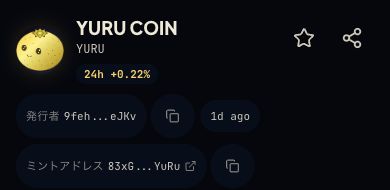
Details & checks
- Search the coin list for YURU and open YURU COIN.
- Compare the entire mint address. A matching name or image is not enough.
- Old YURU and the old-token exchange are separate from this purchase.
The full mint address matches.
YURU COIN mint address
83xGH23oFrEFsovtpnEYPHc4iYvtyVpquwV91A8bYuRu - 05
Review and buy
After sign-in, check the amount and quote.
1Enter the amount of SOL to spend 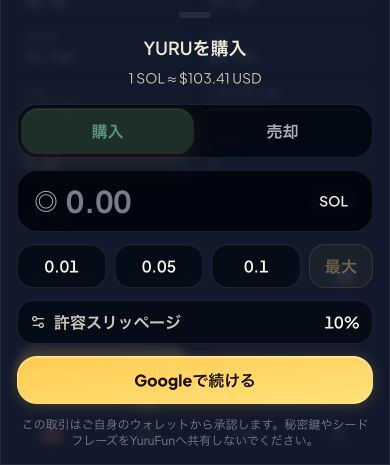
AmountQuoteWallet approval
Details & checks
- Connecting your wallet grants Tier 1; a separate identity-document submission is not required for this step. Check region and account restrictions on screen.
- Select Buy on YURU COIN and enter the SOL amount to spend. A USD display is not a card charge.
- Review estimated and minimum received, maximum slippage, and network fee + tip.
- If you accept the quote, select Buy YURU. Read the wallet confirmation and authorize only the intended transaction.
After submission, wait for transaction confirmation.
- 06
Check completion and balance
After confirmation, check your balance and history.
1Check your YURU COIN balance 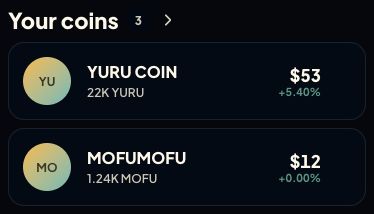
Illustrative screen · balances are examples
Details & checks
- Check the confirmed status and transaction result.
- Open the dashboard, or Your coins on mobile, and check the same wallet.
- If pending, syncing, or unknown, check the existing transaction and balance before buying again.
The transaction is confirmed and YURU COIN appears in your balance.
What you need
- An email address that can receive verification codes.
- SOL for your purchase and network fees.
- A signed-in, connected wallet (Tier 1).
Need help?
Do I need to install another wallet first?
Email and supported social sign-ins create a Solana wallet if needed. No additional wallet app is required just to create an account.
Can I buy directly with yen or a credit card?
This procedure uses SOL. Card or cash top-ups are not guaranteed; check the options and conditions shown for your account.
Why is Buy unavailable?
Check sign-in, the connected wallet, SOL balance, and the reason shown on screen. Region, account, and coin restrictions may apply.
What if I sent SOL but cannot see it?
Check the sending transaction, Solana network, and full destination address. Make sure you are viewing the account you funded.
The purchase is still pending. Should I buy again?
Check the existing transaction and balance before buying again. A delayed screen update does not prove failure.
Where can I open this guide again?
Open Getting started from navigation. On the web, you can also print or save this manual as a PDF.